
YouTube Music

1,048 ratings
Screenshots
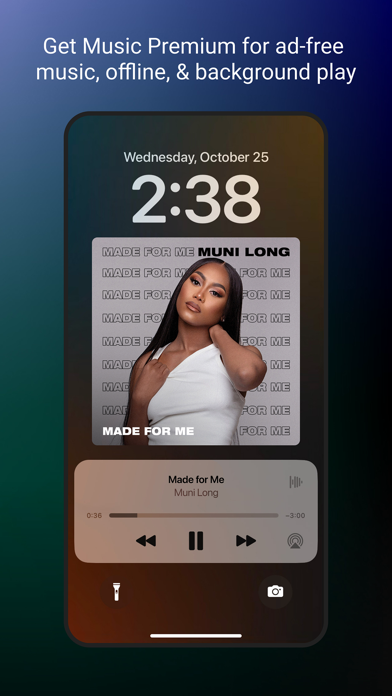
Information
-
Category:Music & Audio
-
Price:Free
-
Age Rating:Everyone
-
Rating:4.8
-
Downloads:5.00B
-
Version:8.50

Is YouTube Music's audio quality actually good? As one of the world's most popular video streaming platforms, YouTube not only offers a vast library of songs and playlists, but also its own dedicated YouTube Music platform, recommending more music based on user preferences. However, many people are unclear about the specifications and effects of YouTube Music's audio quality. You might want to know how YouTube Music's audio quality compares to other platforms, or the difference between the free and paid versions. All these questions can be answered in this article!
Furthermore, we'll also introduce a professional YouTube Music download software, allowing you to obtain the files while retaining the maximum audio quality of YouTube. If you have the same needs, be sure to bookmark this article!
What is the maximum audio quality on YouTube?
Many people may think that YouTube Music's audio quality doesn't significantly impact their daily listening experience, but for users with discerning ears, even subtle differences in sound quality can be crucial to the overall experience. Compressed audio can lead to issues like current noise and background noise, weakening the song's depth and making the timbre sound less clean and crisp.
You're probably curious about the range of YouTube Music's audio quality, wondering if the poor quality of the original audio source or the subsequent compression by the platform is causing the audio degradation. If you're a free member, your YouTube audio quality is capped at 128 kbps, which might not be enough for those who prefer high-quality YouTube music. However, if you are a paid member of YouTube Music Premium, you can enjoy audio quality up to 256 kbps.
Even if you've subscribed to a Premium plan, you might still find YouTube Music's sound quality poor, with no apparent improvement. This is because the app defaults to lower sound quality to reduce data usage during streaming.
Can you adjust the sound quality in YouTube Music? Of course! However, you'll need to manually adjust it to improve the audio.
Next, we'll explain the steps for both the computer and mobile app to help you quickly upgrade your music quality.
If you're a computer user:
Step 1. Open YouTube Music on your computer, then click on your profile picture in the upper right corner > "Settings".
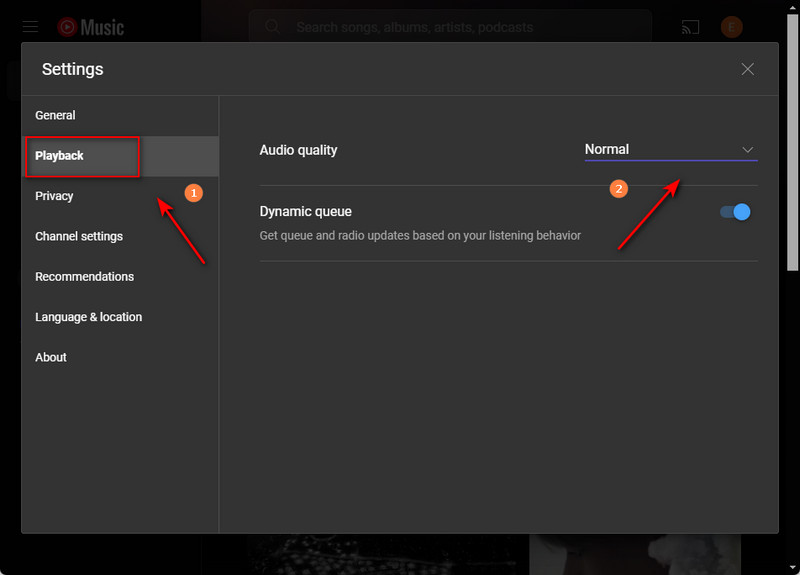
Step 2. Click "Playback" on the left, and then select "High" audio quality in the audio quality field to adjust the upper limit of YouTube audio quality.
If you are a mobile user,
Step 1: Open the YouTube Music app, then tap your profile picture in the upper right corner > Settings.
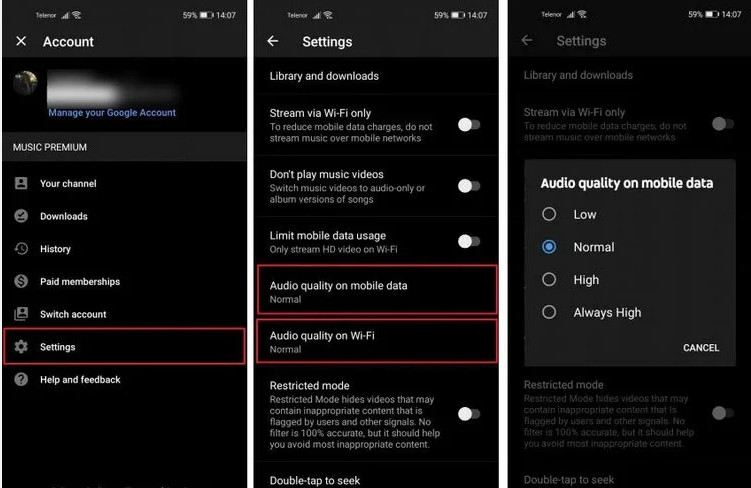
YouTube Music Audio Quality Comparison
Is YouTube Music's audio quality good? Compared to other platforms on the market, Spotify offers audio quality up to 320 kbps, while Apple Music even offers lossless audio. Although YouTube's audio quality can't match these platforms, you can enjoy music while watching music videos and even search for more works from smaller creators. Therefore, most users are satisfied with YouTube Music Premium, believing it provides a stable and good YouTube Music download experience.
Overall, YouTube Music's audio quality might be slightly lacking, but its content selection is more diverse. If you're looking for a good balance of visuals and sound and want to discover more covers or smaller works, then YouTube Music is a good choice. Conversely, if you are very particular about sound quality and want to support albums by mainstream artists, you can choose other streaming platforms, such as downloading songs on Spotify.
 Google Play
 App Store
Similar Apps





Trending Apps

Contacts
Communication
3.5

YouTube Music
Music & Audio
4.8

Social
4.7

Carrier Services
Communication
4.2

Google Assistant
Productivity
4.7

Google Messages
Communication
4.6

Google Play Games
Entertainment
4.4

Messenger
Communication
4.7

Microsoft OneDrive
Productivity
4.7

Carrom Pool: Disc Game
Sports
4.6